

How to Make a QR Code: Step-by-Step Guide (Plus Custom Shapes) for 2026
Making a QR code takes minutes once you know what you're doing: pick what the code should do, generate it with a QR code generator, set the error correction, then test it on a real phone before you print or publish it. That five-step process hasn't changed much in years. What has changed in 2026 is how much design freedom brands take once the code works — swapping the plain black-and-white square for a shape, color, or logo that matches the brand. This guide walks through both: the basics of creating a QR code that scans every time, and how to push it further with a custom shape without breaking it.
How to Make a QR Code in 5 Steps
To make a QR code, choose the destination (a URL, text, Wi-Fi login, or contact card), enter it into a QR code generator, set the error correction level, preview the design, and download it — then test the file on at least two different phones before you publish or print it. Skipping the test step is the single most common reason codes fail in the wild.
Decide what the code should do. A QR code can open a URL, dial a number, join a Wi-Fi network, save a contact, or display plain text. Most marketing use cases point to a link, so decide on the destination page first.
Pick a generator. Free tools like Smler's QR code generator let you create a code in seconds, but not all generators are equal — if you plan to run more than one code or need scan data later, it's worth comparing options against a QR code generator with tracking before you commit.
Set the error correction level. This is the redundancy built into the code that lets it still scan even if part of it is damaged, dirty, or covered by a logo. Use "Medium" for a plain code and "High" if you plan to add branding or a shape later.
Style it if you want to. Add your brand color, a logo, or rounded corners. This is optional — a plain black-and-white code works fine for most uses.
Test it, then track it. Scan the finished code on two or more phones, in different lighting, before it goes live. Once it's published, keep an eye on scan counts so you know it's actually being used.
How to Make a QR Barcode: Is a QR Code the Same as a Barcode?
A QR code is a barcode — specifically a two-dimensional "matrix" barcode that stores data in a grid of squares, unlike the striped one-dimensional barcodes used on grocery items. Making a QR barcode uses the exact same process as making any QR code: choose the 2D/QR format in your generator, enter your data, and export the image.
The practical difference is capacity and use case. A traditional 1D barcode can only hold a short numeric string and needs a laser scanner. A QR code can hold a full URL, several hundred characters of text, or a Wi-Fi password, and any smartphone camera can read it — which is why marketing, packaging, and event materials moved to QR over the older barcode format.
How to Create a QR Code for Your Website
To create a QR code for your website, point it at a shortened link instead of your raw URL, set error correction to "High," download it as a PNG or SVG, and place it somewhere with good lighting and enough white space around it to scan cleanly. Using a short link matters more than it sounds — it's the difference between a code you can fix later and one you have to reprint.
If the code is going on packaging, a poster, or a storefront rather than a screen, treat it as an offline-to-online bridge: the destination page should load fast on mobile and make it obvious what happens next. For campaigns that route to an app when it's installed and a web page when it isn't, see our guide to QR code deep links for offline marketing.
How to Create a Custom QR Code (Beyond the Standard Square)

A custom QR code is a standard code reshaped into a circle, hexagon, logo outline, or product silhouette instead of the plain square. The data underneath doesn't change — the black-and-white "modules" are simply rearranged to fit a new container. Done well, it looks like part of the design. Done carelessly, it stops scanning.
Reshaping a code isn't a Photoshop trick you apply after the fact; it's a design decision you make from the start, with error correction set high enough to survive the changes. If you want branding without reshaping the whole thing, adding a logo to the center is a lower-risk option — see how to create a QR code with a logo in the center for that approach.
Why Use a Custom-Shaped QR Code Instead of a Standard One?
They get noticed. People are wired to notice things that break a pattern. If every code on a shelf is a square, a circle stands out before anyone even reaches for their phone.
Scan rates can be higher. Custom designs are often reported to lift engagement over a plain square — but it's a double-edged sword. A shape that doesn't scan kills the interaction instantly. You get the curiosity without the function.
It signals intent. A generic square code feels like a utility bolted onto the design. A custom one feels like it was made for the campaign, which is a small but real quality signal to the person scanning it.
What Types of Custom QR Code Shapes Are There?
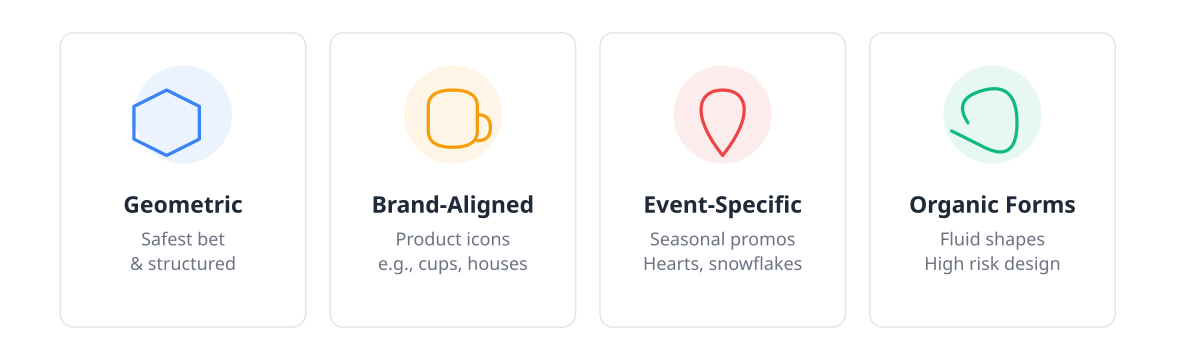
Custom shapes generally fall into four categories, ranked from safest to riskiest:
Geometric twists: rounded corners, circles, hexagons. Different enough to catch the eye, but structurally close to a standard code, so they're the safest place to start.
Brand-aligned shapes: a coffee cup for a café, a house for a realtor. These tie the code to the product instantly but need more careful design work to stay readable.
Event-specific shapes: hearts for a Valentine's promo, snowflakes for winter. Effective for a short run, but they date fast and aren't worth the design time for anything ongoing.
Organic forms: fluid, amorphous shapes. They look great in a portfolio and are the hardest to get scanning reliably across different phones and apps — treat these as a last resort.
What Makes a Custom QR Code Actually Scannable?
A custom QR code stays scannable when error correction is set high (around 25–30% instead of the standard 7–15%), the quiet zone around the code is left empty, contrast between dark and light modules stays high, and the design is tested on more than one phone before it ships. Miss any one of these and the "custom" part of the code stops mattering because it simply won't scan.
Error correction is your lifeline. Reshaping a code is effectively damaging it on purpose, and error correction is what fills in the resulting gaps. Set it to the highest level your generator offers before you start designing.
The quiet zone matters. Leave roughly four modules of empty space around the code. Crowd it with text or artwork and scanners lose their reference points.
Contrast is non-negotiable. Brand colors are fine, but the dark and light modules need enough contrast between them. A pastel-only palette will fight you here.
Test on ordinary phones. A code that scans instantly on a new iPhone might fail on an older, budget Android in dim light. If it fails there, you're excluding real users.
How to Build a Custom QR Code Step by Step (with Smler)
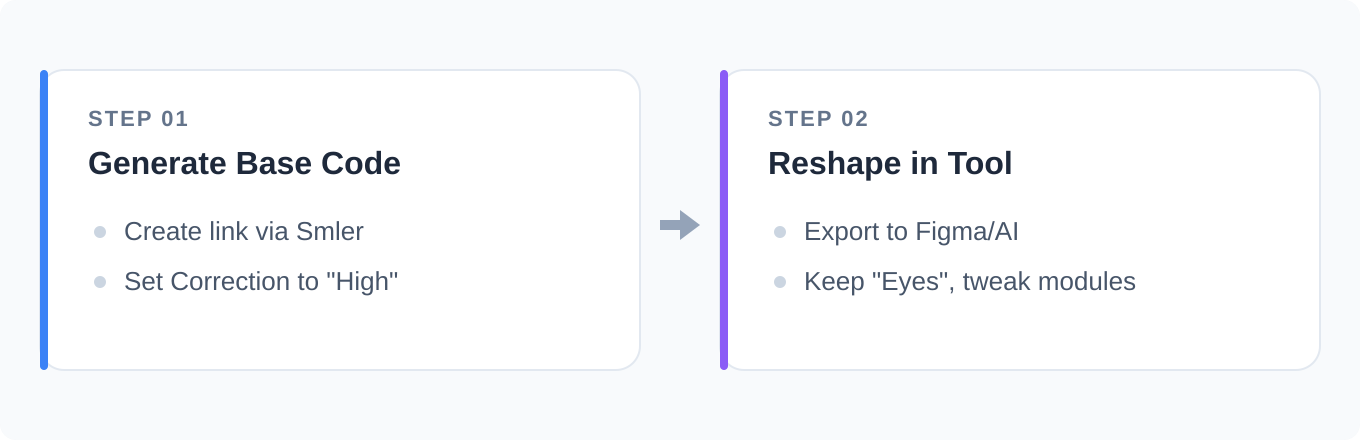
Building a custom shape isn't a one-click job — it's a short workflow that starts with a solid base code and ends with real-world testing.
Generate a bomb-proof base code. Create your link with Smler's QR code generator and set error correction to "High." This gives you the most room to reshape later and keeps your analytics tracking intact.
Reshape it in a design tool. Export the code into Illustrator or Figma. Keep the three "eyes" — the large squares in the corners — as close to intact as possible; they're what tells a phone "this is a QR code." Reshape the internal modules carefully, since breaking the pattern too much kills the code entirely.
Test it, then test it again. Scan the reshaped code with different apps on different phones before it goes anywhere near print. Confirm your scan tracking registers each test.
Watch the data once it's live. If scans drop off or you see a spike in incomplete visits, the shape is likely the problem — dial back the design before it costs you more traffic.
Common Mistakes When Making QR Codes
Prioritizing "cool" over "works." Between a perfect logo-shaped code that scans 80% of the time and a plainer one that scans 100% of the time, pick the one that works. A missed scan is a lost customer, full stop.
Skipping the quiet zone. Beautiful designs that let the code bleed straight into background art look seamless and often don't scan.
Generating the code from a raw URL. If you can't change the destination later, you're stuck reprinting everything. Always build the code from a short link so you can swap the destination or check performance without touching the printed code.
Making it too small. Complex shapes need more physical space to stay readable. If the code is going on a business card, simplify the design first.
Real-World Custom QR Code Examples That Work
Product packaging: a beverage brand uses a bottle-shaped code on the label that opens a recipe page — the shape fits the context so it feels native to the package rather than stuck on top of it.
Event badges: a tech conference shaped codes like its hexagonal logo, using deep linking to send attendees straight into the event app instead of a generic landing page.
Retail displays: in-store signage with product-shaped codes bridges the gap between the shelf and online reviews with a single scan.
What's Next for QR Code Design?
Expect more AI-assisted design tools promising to auto-generate scannable shapes over the next year or two. That may lower the design barrier, but it won't remove the need to test on real phones before launch.
Custom shapes aren't necessary for every campaign — a standard code with a logo in the center works fine for most uses. But for high-visibility projects where brand cohesion matters, the extra design hours are worth it. Just remember the rule that governs everything above it: if it doesn't scan, it's not a QR code, it's just art. Start with a standard code from Smler's generator, get the basics right, then bend the rules.
Frequently Asked Questions
How do I create a QR code for free?
Use a free QR code generator: enter the destination link or text, choose the QR format, set error correction, and download the image — no design software required. Free tools cover most needs; you only need paid features if you want editable destinations, scan analytics, or bulk creation.
How long does it take to make a QR code?
A basic QR code takes under a minute once you know the destination link. Add a few extra minutes for setting error correction and testing on a phone. A custom-shaped version takes longer — usually an hour or more for design and testing — because it needs to be built, not just generated.
Can I change a QR code's destination after it's printed?
Only if you built it from a short link rather than a raw URL. A short link lets you edit where it points without touching the printed code, while a code generated straight from a URL is permanently tied to that address and can't be redirected.
What's the difference between making a QR code and making a QR barcode?
None, functionally — a QR code is a type of barcode, so "making a QR barcode" and "making a QR code" describe the same process. The distinction only matters when comparing QR codes to older 1D barcodes, which hold less data and need a dedicated scanner instead of a phone camera.
Do custom-shaped QR codes scan as reliably as standard ones?
Not automatically — a reshaped code is more fragile than a plain square unless you compensate for it. Raising error correction, keeping the quiet zone clear, and testing on multiple phones brings a custom shape close to standard reliability, but skipping any of those steps increases the chance it fails to scan.
Published with LeafPad