
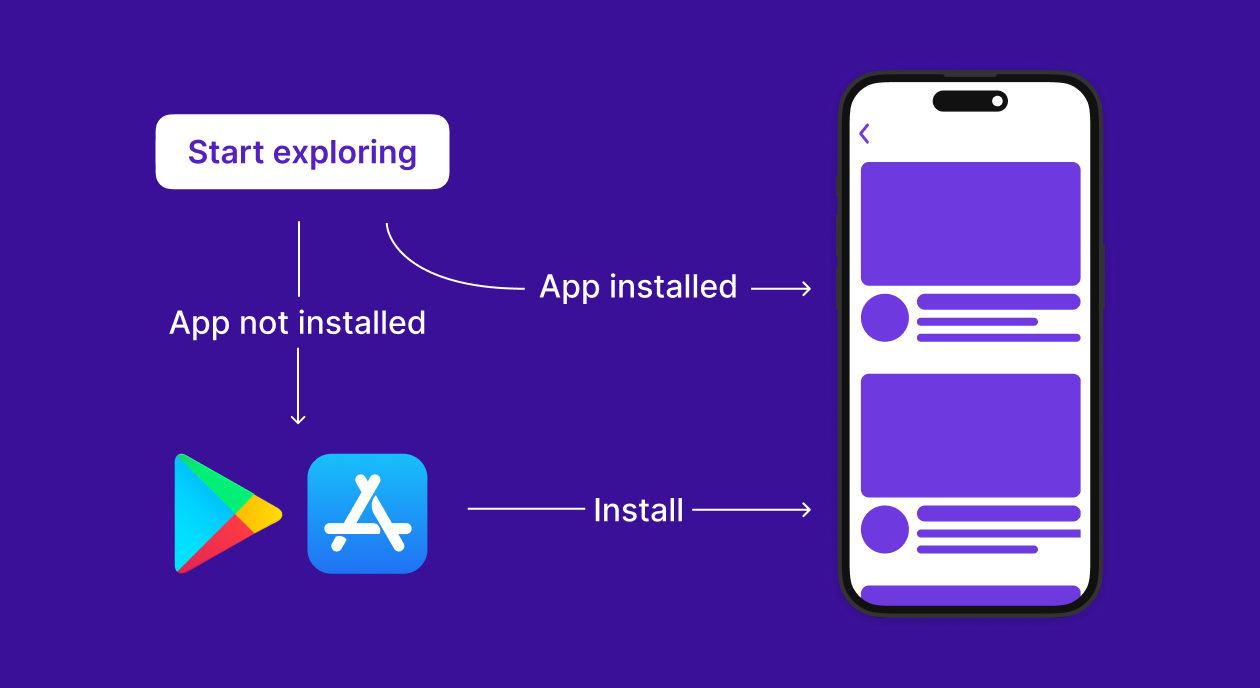
Deferred deep links let you send users to specific screens after they install your iOS app, even if they didn’t have the app installed when they clicked the link. This creates a smooth user experience and is a powerful tool for marketing, onboarding, and referrals.
In this guide, you’ll learn:
What deferred deep links are
How to handle custom URL schemes and Universal Links
How to capture Smler’s install referral data
How to route users based on parameters
🔗 What Is a Deferred Link?
When a user clicks a Smler deferred link and installs your iOS app:
The link data is stored temporarily by Smler.
After install, the app hits an endpoint to fetch install details.
The app uses that data to navigate to the right screen.
Let’s implement this in Swift.
🧩 Step 1: Register Your Custom Scheme in Xcode
In Xcode:
Go to your app target → Info tab.
Scroll down to URL Types.
Click + to add a new URL Type.
Enter the following:
Identifier: anything like
com.smler.linkURL Schemes:
smler(ormyawesomeapp, etc.)
Your app will now respond to links like:
smler://offers?page=123
📲 Step 2: Handle Incoming Links in AppDelegate
In your AppDelegate.swift, implement the open url method:
func application(_ app: UIApplication,
                 open url: URL,
                 options: [UIApplication.OpenURLOptionsKey : Any] = [:]) -> Bool {

    print("Received URL: \(url)")

    // Parse path or query
    if let components = URLComponents(url: url, resolvingAgainstBaseURL: false) {
        if let page = components.queryItems?.first(where: { $0.name == "page" })?.value {
            navigateTo(page: page)
        } else {
            navigateTo(path: url.path)
        }
    }

    return true
}
You can also route using the URL path like /offers/123.
🔧 Step 3: Call Smler’s Deferred Install API on First Launch
When the app is launched for the first time, you need to ping Smler to retrieve the install referral data.
Here’s how to do that:
➕ Add This in Your Initial View or Launch Logic:
import Foundation

class DeferredLinkManager {
    static func fetchDeferredInstallData() {
        let hasFetched = UserDefaults.standard.bool(forKey: "hasFetchedDeferredInstall")
        if hasFetched {
            print("Already fetched deferred install")
            return
        }

        guard let url = URL(string: "https://smler.in/api/v1/deferred-link/install?device=ios") else { return }

        let task = URLSession.shared.dataTask(with: url) { data, response, error in
            guard error == nil, let data = data,
                  let responseString = String(data: data, encoding: .utf8) else {
                print("Deferred install fetch failed")
                return
            }

            print("Deferred install data: \(responseString)")

            DispatchQueue.main.async {
                handleDeferredLink(responseString)
                UserDefaults.standard.set(true, forKey: "hasFetchedDeferredInstall")
            }
        }

        task.resume()
    }
}
🧭 Example of Handling a Deferred Link
func handleDeferredLink(_ link: String) {
    guard let url = URL(string: link) else { return }

    if let components = URLComponents(url: url, resolvingAgainstBaseURL: false),
       let page = components.queryItems?.first(where: { $0.name == "page" })?.value {
        navigateTo(page: page)
    } else {
        navigateTo(path: url.path)
    }
}
Call DeferredLinkManager.fetchDeferredInstallData() during your splash screen or app launch.
🧠 Step 4: (Optional) Support Universal Links (HTTPS)
If you’re using https://smler.in/... URLs, you’ll need to:
Add
Associated Domainscapability.Add this entry:
applinks:smler.in
Ensure Smler hosts the apple-app-site-association file (you can request this).
Then handle links in SceneDelegate.swift:
func scene(_ scene: UIScene,
           continue userActivity: NSUserActivity) {

    guard userActivity.activityType == NSUserActivityTypeBrowsingWeb,
          let incomingURL = userActivity.webpageURL else {
        return
    }

    print("Universal Link URL: \(incomingURL)")
    // Parse and route
    handleDeferredLink(incomingURL.absoluteString)
}
🔐 Best Practices
✅ Call the install API only once and store a flag using
UserDefaults.🚫 Avoid hardcoding link formats — always parse using
URLComponents.🧪 Test using real devices with real installs (App Store builds or TestFlight).
🧪 Example Link You Can Generate in Smler
smler://offers?page=welcome2025Or:
https://smler.in/offers?page=welcome2025Both can be deferred, and once your app is installed, the user will be routed accordingly.
🚀 Wrap Up
Integrating Smler’s deferred deep links in iOS is lightweight and doesn’t require third-party SDKs. Using Apple’s built-in support for custom schemes and universal links, you can route users to the right place, even after an app install.
Start generating links now:
👉 https://app.smler.in/app/deferred-link
Have questions or need a sample Xcode project? Drop us a message. We’d love to help you get started!
Published with LeafPad