
How to Create a Short URL (and Make It Look Great When Shared)
A short url takes a long, clunky web address and compresses it into a clean link that's easy to share, remember, and click. Creating one takes seconds with a tool like Smler, but the real value comes from what happens next — controlling how that shortened link looks the moment someone shares it on social media, WhatsApp, or email.
What Is a Short URL?
A short url is a compact link that redirects visitors to a longer destination address when clicked. Short urls save space, look cleaner in messages and ads, and let you track clicks — you'll also see the same idea called a shortlink url, shortened link url, or short link url depending on the platform.
Behind every short link url sits a redirect rule pointing to your real destination page. Good URL shorteners let you use a custom branded domain instead of a generic one, which builds trust and recognition every time the link is shared.
How to Create a Short URL in 3 Steps
To create a short url, paste your long link into a URL shortener, choose a custom domain or slug, then generate and copy the shortened link. In Smler this takes under a minute, whether you need one link or a batch of thousands.
- Paste your destination URL — drop the long link you want to shorten into the dashboard.
- Customize the domain or slug — use your own branded domain so the link to short URL matches your brand instead of a random string.
- Generate and copy — your new short link url is ready to paste into a text, email, ad, or social post.
If you're shortening large volumes of links for a campaign, Smler also supports bulk uploads via CSV or XLSX so you're not repeating this process one link at a time.
How to Shorten a URL Without Losing Its Preview
You can shorten a url without sacrificing how it looks when shared by adding Open Graph (OG) tags to the short link. Instead of a generic snippet, viewers see a custom title, description, and image — which measurably improves click-through rates on social platforms and messaging apps.
This matters because a plain, unbranded preview makes people hesitate before clicking. Pairing a branded domain with a custom preview closes that trust gap; see how much of a difference this makes in our branded vs generic short links comparison.
What Are OG Tags and Why Do Short URLs Need Them?
Open Graph (OG) tags are meta tags on a webpage that control how a link appears when shared — the preview title, description, image, and URL. Without them, a shortened link often falls back to a bare title or nothing at all, which looks unfinished next to links that show a rich preview card.
Setting OG tags gives you full control over that first impression, which is often the deciding factor in whether someone taps a link on their feed.
How Does Smler Handle OG Tags by Default?
Smler automatically pulls and displays the OG tags from your destination URL every time the short link is shared, so most links show a sensible preview with zero setup. If you want a different title, description, or image than the destination page uses, you can override this manually when you create the link.
How to Set Up Custom OG Tags for Your Short URL in Smler
Setting custom OG tags takes less than a minute inside the Smler dashboard, and you can manually set them each time you create a URL.
Step 1: Create a short URL
Generate a short url the way you normally would in Smler.
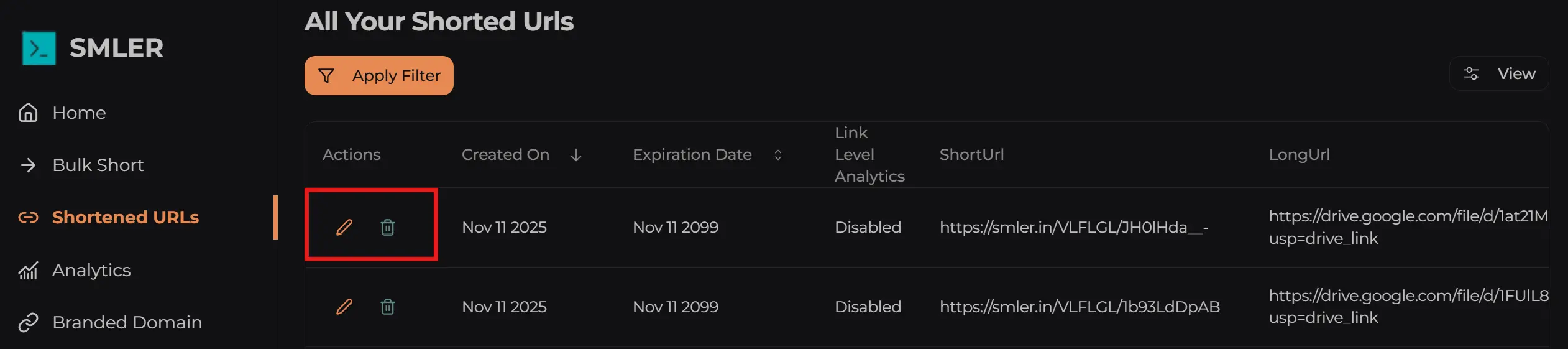
Step 2: Edit the link
Go to the edit section of the link you just created.
Step 3: Add custom OG tags
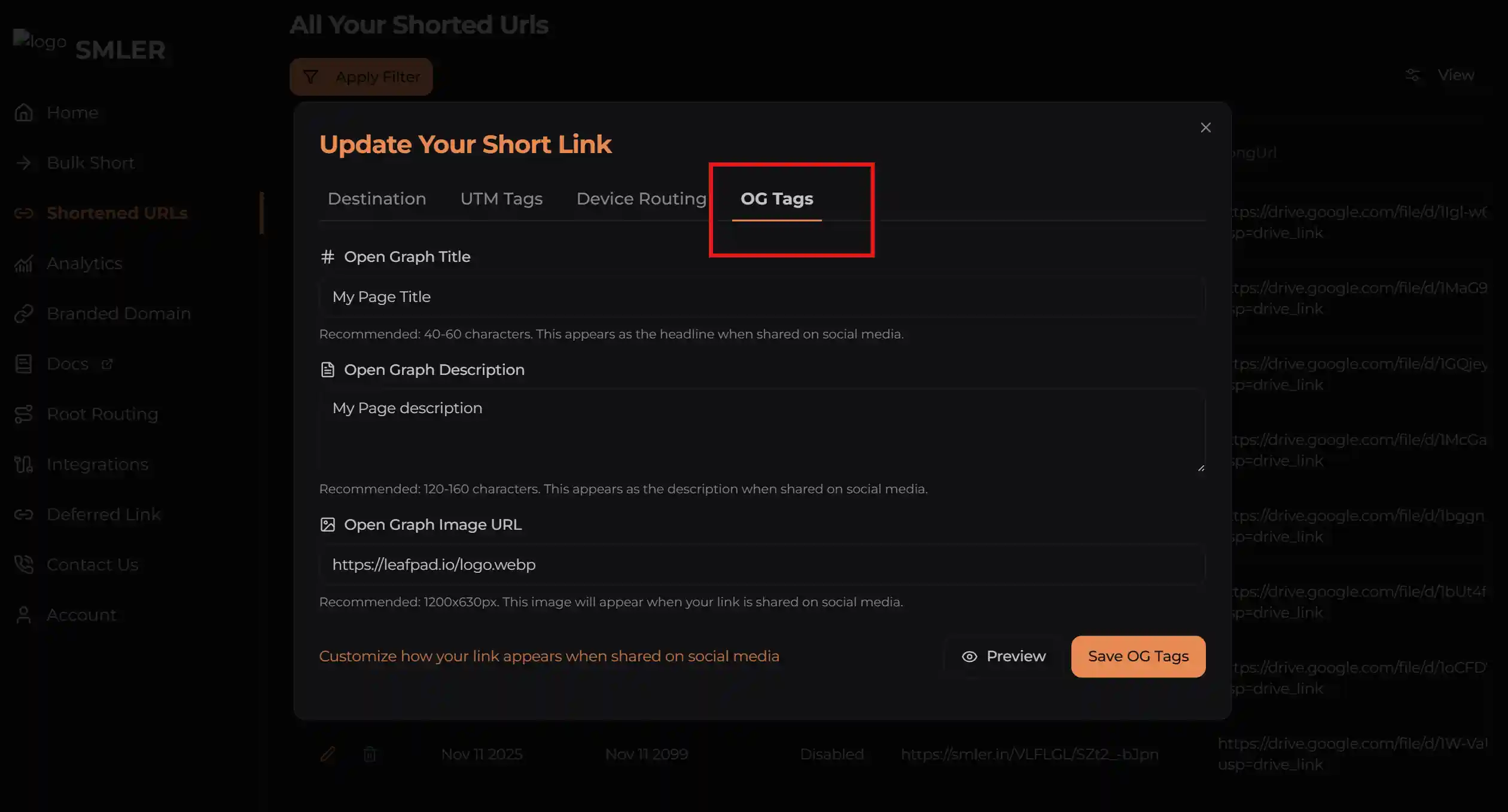
Inside the edit screen, select the og tags tab.
Step 4: Add your custom tags
Enter your custom title, description, and image. Once these fields are populated, click the preview button beside "save OG tags" to see how the card will render before you publish it.
How to Test and Preview Your Shortened Link Before Sharing
After saving your OG tags, share the link on Facebook, WhatsApp, or LinkedIn to see the real preview on each platform, since rendering can differ slightly between them. Previews are cached, so changes can take up to 5 minutes to reflect in production — wait a few minutes and refresh before assuming something is wrong.
To check exactly what your server returns to a crawler, simulate a bot request from the command line:
curl -A "Mozilla/5.0 (compatible; Googlebot/2.1; +http://www.google.com/bot.html)" \
     -H "Accept-Language: en-US,en;q=0.9" \
     -L \
     -i \
     <your url>
Why Use Smler to Create and Customize Short URLs
Most tools charge extra for custom link previews; Smler includes OG tag customization on its basic plan, alongside branded custom domains, root routing, and link-level analytics to see exactly who clicked, from where, and on what device.
Read more on how to configure OG tags using the API, browse the deep linking guides for different platforms, or check the pricing plans to find the tier that fits your volume of links.
Smler is built for scale on enterprise-grade infrastructure. If you have questions about a feature or want something implemented, reach out and our team will help.
Frequently Asked Questions
How do I create a short url?
To create a short URL, hit the Smler endpoint with a long URL, and Smler will generate a unique short URL and pass it back to you. You can also override the default behavior by passing a specific short code in the payload if you want your short URL to be a specific string.
What's the difference between a short link url and a regular link?
A regular link is the full, often long web address. A short link url is a compressed version that redirects to that same destination while looking cleaner, tracking clicks, and optionally showing a custom preview card when shared.
How can I shorten a url and still control how it looks when shared?
Shorten the url as usual, then open the link's edit screen and add custom OG tags — a title, description, and image. This overrides the default preview so your shortened link url shows exactly what you want on social and messaging apps.
Is it free to make a short url with a custom preview?
Basic OG tag customization is included in Smler's entry-level plan rather than gated behind an enterprise tier, so you can create short url links with branded previews without upgrading. Check current plan details on the pricing page for exact limits.
Why does my shortened link url still show the old preview?
Social platforms cache link previews, so changes can take a few minutes to appear even after you save new OG tags. Wait roughly five minutes, then re-share or refresh the link on the platform to confirm the new preview has taken effect.
Published with LeafPad