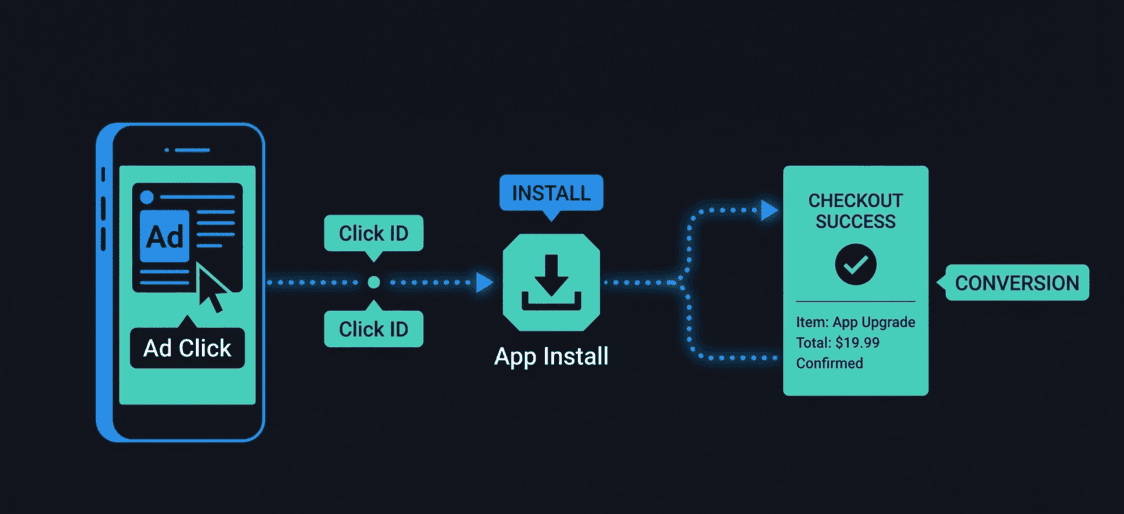
Reports a completed purchase event back to Smler so the attributed click gets credit for the conversion.
Method: POST
https://smler.in/api/v2/conversion/track/saleHow it fits into a deferred deep linking flow
The clickId ties a purchase back to the original ad click even if the user installed the app days later. Here is the complete attribution chain:
To extract clickId you can read deferred deep link docs it has approach on how to extract
1. User click your ad or referral
Smler generates a unique clickId and passes it through the redirect.
2. App Installs
Capture clickId on first launch via Android referrer or probabilistic matching. Persist it locally.
3. User Subscribes or completes Payment
Payment succeeds. Read the stored clickId and fire this endpoint.
4. Conversion recorded
Smler attributes the sale to the original click, campaign, and channel
Note: There can be a delay between when a user signs up to payment. So, make sure to save clickId in storage so that you can refer back to this variable when there's a payment. This will help in attributing the user back to original source. It is recommended to send this attribution from your server so that the requests are not intercepted client side and manipulated.
Check our Postman collection to see how the API contract looks for this endpoint.
Published with LeafPad