
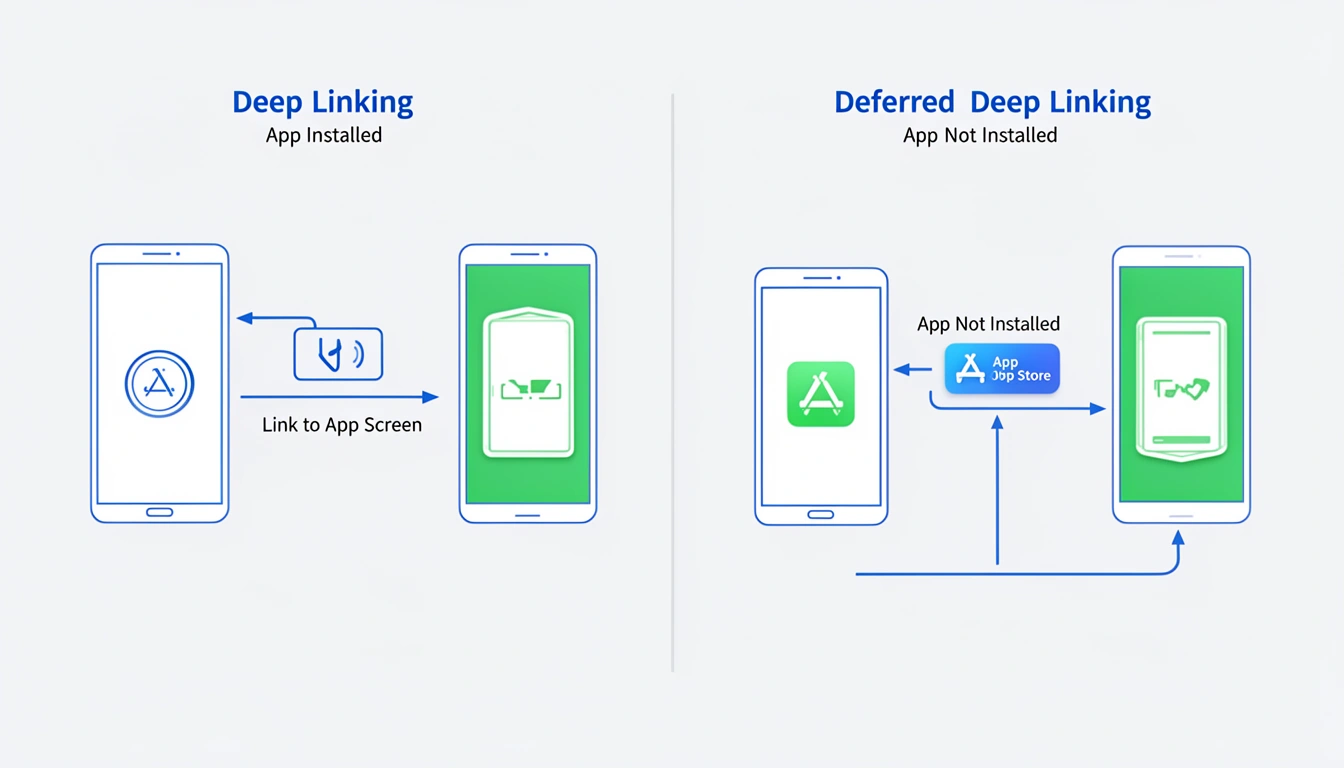
Deep linking launches your app to a specific screen. Deferred deep linking does the same thing, but after the user installs your app. The key difference: deferred deep linking preserves routing context across the install boundary, while standard deep linking only works when the app is already installed.
Both are essential for mobile apps in 2025, but they solve fundamentally different problems in the user journey.
What Deep Linking and Deferred Deep Linking Actually Mean
Deep linking is a URI scheme or universal link that opens your app to a specific destination instead of the home screen. When a user taps yourapp://product/12345, your app parses the URL and navigates to that product page.
Think of it like bookmarking a specific chapter in a book instead of always opening to page one.
Deferred deep linking extends this concept across the install gap. When a non-user clicks a link, they can't deep link because the app doesn't exist on their device. Deferred deep linking stores the intended destination, sends the user through the App Store or Play Store, and then routes them to the correct screen on first launch.
The mental model: deferred deep linking is deep linking with memory. It remembers where the user wanted to go before installation happened.
Here's what happens in each scenario:
Scenario | Deep Linking | Deferred Deep Linking |
|---|---|---|
App installed | Opens app to specific screen | Opens app to specific screen |
App not installed | Fails (fallback to web or error) | Install → then routes to screen |
Context preservation | Immediate | Persisted through install |
Implementation complexity | Low | Medium to High |
Standard deep linking is purely client-side. The operating system handles the routing, and your app processes the URI. Deferred deep linking requires infrastructure to store routing parameters server-side and match them to the device after installation.
How Deep Linking vs Deferred Deep Linking Works Under the Hood
Let's walk through both flows at the technical level.
Standard Deep Linking Flow
User clicks link:
https://yourdomain.com/product/12345OS checks if an app claims this domain (via iOS Universal Links or Android App Links)
If app is installed, OS passes the URL to your app delegate or intent filter
Your app parses the URL and navigates to
/product/12345User sees the product page immediately
On iOS, this happens through application(_:continue:restorationHandler:) in your AppDelegate. On Android, it's handled via intent filters with autoVerify="true" for App Links.
The entire flow is synchronous and deterministic. No external service required.
Deferred Deep Linking Flow
User clicks link:
https://yourdomain.com/product/12345Server detects app is not installed (via user-agent or attempt/fallback logic)
Server stores routing parameters (
product_id: 12345) associated with device fingerprintUser is redirected to App Store / Play Store
User installs app and launches it
On first launch, your app queries the deferred deep link server
Server matches device fingerprint and returns stored parameters
Your app routes to
/product/12345
The critical component is step 3: device fingerprinting. This typically uses a combination of IP address, user-agent, advertising ID (IDFA on iOS, GAID on Android), and timing windows.
Accuracy varies. In ideal conditions with unique device signatures, matching succeeds 95%+ of the time. In challenging scenarios (corporate WiFi, VPNs, privacy-focused browsers), it drops significantly.
iOS 14.5+ made this harder with App Tracking Transparency. Without IDFA access, you're limited to less precise signals. Deferred deep linking systems now rely more on server-side click IDs passed through install referrers where possible.
Android's Play Install Referrer API provides more reliable attribution. You can pass a click ID through the referrer parameter and retrieve it on first launch without fingerprinting ambiguity.
Common Mistakes and Edge Cases That Break Everything
After implementing both deep linking and deferred deep linking across multiple production apps, here are the issues that actually happen:
1. Not Handling the "Already Installed" Case in Deferred Flows
Your deferred deep link logic should check if the app is already installed before routing through the store. If you don't, returning users get sent to the App Store unnecessarily, which tanks conversion rates.
Solution: Use JavaScript app detection or server-side user-agent parsing to attempt a direct deep link first, with store redirect as fallback only when the attempt times out.
2. Fingerprint Collisions in Shared Environments
Multiple users on the same corporate network or family WiFi can create identical fingerprints within matching time windows. User A clicks a link for Product X, User B installs the app, and gets routed to Product X instead of their intended destination.
This is rare but catastrophic for user experience. No perfect solution exists without deterministic IDs. Best practice: narrow your matching window to 5 minutes maximum and weight GAID/IDFA heavily when available.
3. iOS Universal Links Breaking on First Tap
If a user long-presses your universal link and chooses "Open in Safari" or if your link redirects through another domain, iOS disables universal linking for that domain. Subsequent taps open Safari instead of your app.
Users can re-enable it by pulling down on the banner that appears in Safari, but most won't. Avoid redirects in your universal link flow at all costs.
4. Android Intent Filters Too Broad or Too Narrow
If your intent filter matches too many URL patterns, other apps might intercept your links. Too narrow, and edge cases fail (like URLs with query parameters you didn't anticipate).
Test with real-world URLs that include UTM parameters, tracking IDs, and other query strings your marketing team will inevitably add.
5. Deferred Deep Link Data Timing Out
Users don't always install immediately. They might click a link, browse the App Store, install other apps first, and install yours hours later. If your server expires stored parameters after 15 minutes, you lose the context.
Recommendation: 24-hour expiration with probabilistic matching confidence scores. Low-confidence matches should fall back to home screen rather than risk routing to the wrong place.
Best Practices for Production Deep Linking Systems
Here's what actually works in production apps handling millions of deep links:
Always Implement Both Deep Linking and Deferred Deep Linking
You need standard deep linking for existing users and deferred deep linking for acquisition. They're not mutually exclusive—they're complementary parts of the same user journey infrastructure.
Use Platform-Native Solutions Where Possible
iOS Universal Links and Android App Links are more reliable than custom URI schemes (yourapp://). Universal links work in more contexts, don't trigger confirmation dialogs, and fall back to web gracefully.
Custom schemes still have uses (internal app-to-app communication, developer testing), but HTTPS-based links should be your primary implementation.
Validate Deep Link Destinations Before Routing
Don't blindly navigate to whatever URL you receive. Validate that the destination exists and the user has permission to access it. Otherwise, users see error screens or unauthorized access messages after you promised them relevant content.
// Bad navigator.push(parseRoute(deepLinkURL)); // Good const route = parseRoute(deepLinkURL); if (await validateRouteExists(route) && await checkUserPermissions(route)) { navigator.push(route); } else { navigator.push('/home'); logDeepLinkError(deepLinkURL, 'invalid_destination'); }Build Comprehensive Deep Link Testing Infrastructure
You need to test both installed and uninstalled states across multiple OS versions. Automated testing is difficult because it requires real devices and app installation.
Maintain a test matrix that covers:
iOS 15, 16, 17+ (universal links behavior changes)
Android 11, 12, 13, 14+ (app links and install referrer changes)
Installed vs. fresh install states
Various network conditions (WiFi, cellular, VPN)
See testing deep links on iOS and testing deep links on Android for platform-specific approaches.
Track Deep Link Performance Separately
Measure success rates for both standard and deferred deep links independently. Key metrics:
Link click → app open rate
Deferred deep link match accuracy
Time from click to first app open
Routing success rate (reached intended destination)
Low match rates indicate fingerprinting issues. Low routing success suggests validation problems or broken destinations.
Implement Graceful Fallbacks
When deferred deep linking fails to match (and it will fail sometimes), your app should still provide value. Route to a relevant category page or home screen with context about what they clicked.
Never show an error screen to a brand new user. That's a conversion killer.
When NOT to Use Deep Linking vs Deferred Deep Linking
Both techniques have legitimate anti-patterns where simpler solutions work better.
Skip Deep Linking When Your App Has One Main Screen
If your app is essentially a single-purpose tool (calculator, flashlight, simple game), deep linking adds complexity without benefit. Users expect to land on the main screen every time.
Avoid Deferred Deep Linking for High-Security or Financial Flows
Probabilistic matching isn't appropriate when accuracy is critical. Don't use deferred deep links to route users to payment screens, account settings, or sensitive data.
For financial apps, use deterministic methods: email magic links, SMS codes, or QR codes that users scan after installation. Slightly more friction, but zero risk of routing to the wrong account.
Don't Over-Rely on Deferred Deep Linking for Core Onboarding
If your entire onboarding flow depends on deferred deep link data arriving, 5-10% of users will have a broken experience. Design onboarding to work without deep link context, with deep linking as an enhancement.
Skip It for Internal Testing Links
When developers need to test specific screens during development, old-fashioned custom URI schemes (devapp://screen/test) are faster and more reliable than setting up full deep linking infrastructure.
How This Fits Into Modern Deep Linking Systems
Deep linking and deferred deep linking are primitives that enable higher-level mobile growth strategies.
In 2025, they're typically part of a larger system that includes:
Smart link routing: The same link detects platform (iOS/Android/web) and user state (installed/not installed) to route appropriately. This is where device-based routing becomes essential.
Attribution and analytics: Deep links carry campaign parameters that track which marketing channel drove the install and engagement. This requires link-level analytics to measure performance across channels.
Cross-platform consistency: Users might click a link on desktop and install on mobile later. Modern systems sync context across devices using deterministic identifiers (email, phone number) rather than probabilistic fingerprinting.
QR code integration: QR code deep links bridge offline marketing to mobile app experiences. The QR encodes a universal link that handles both deep linking and deferred deep linking automatically.
For React Native developers, you implement both using the same libraries and patterns—the distinction is in how the link is generated and tracked server-side. Check the React Native deep linking guide for unified implementation approaches.
The evolution from Firebase Dynamic Links (deprecated in 2025) to modern platforms like Smler shows the industry moving toward unified link management that handles both types of deep linking behind a single URL. You create one link, and the platform handles routing logic for all scenarios.
FAQ: Deep Linking vs Deferred Deep Linking
Can I use deep linking and deferred deep linking with the same URL?
Yes. Modern deep linking platforms generate a single smart URL that handles both scenarios. The server detects whether the app is installed and routes accordingly—direct deep link if installed, deferred deep link if not. This is the standard implementation pattern in 2025.
Does deferred deep linking work without advertising IDs after iOS 14.5?
Yes, but with reduced accuracy. Modern deferred deep linking uses a combination of device signals (IP, user-agent, screen resolution) plus server-side click IDs when possible. Match rates dropped from 98%+ to 85-95% post-ATT, but the technology still works for most users. Some platforms now ask users to copy a code during install for deterministic matching.
How long does the deferred deep link matching window stay open?
Industry standard is 1-24 hours. Shorter windows (1-2 hours) increase match accuracy because fewer devices share identical fingerprints in narrow timeframes. Longer windows (24 hours) capture more delayed installs but risk false matches. Most production systems use 4-6 hour windows as a middle ground.
What happens if multiple users click the same deferred deep link?
Each click creates a separate fingerprint + context pairing on the server. When each user installs, the system matches their device fingerprint to their specific click record. If two users have identical fingerprints (rare but possible), the most recent click within the time window typically wins. This is why click IDs and install referrers are more reliable than pure fingerprinting.
Is deferred deep linking required for attribution tracking?
No. Attribution tracks which link drove an install. Deferred deep linking preserves where in the app the user should land. They often work together (attribution + routing), but they're separate concerns. You can have attribution without deferred deep linking (user clicks link A, installs, opens to home screen, but you know link A drove it). Deferred deep linking adds the routing piece.
Key Takeaways
Deep linking routes users to specific app screens when the app is installed. Deferred deep linking does the same after installation by preserving context across the install boundary.
You need both. Deep linking handles existing users clicking links. Deferred deep linking handles acquisition and first-time install flows. Modern platforms abstract the difference—you create one link that works in both scenarios.
Implementation complexity differs significantly. Deep linking is primarily client-side with platform-native support. Deferred deep linking requires server infrastructure for context storage and device matching.
The biggest technical challenge is post-ATT match accuracy on iOS. Combine multiple signals, use install referrers where possible, and always design fallback experiences for when matching fails.
In production systems, both techniques are primitives in a larger mobile growth stack that includes attribution, analytics, smart routing, and cross-platform context sync. The trend is toward unified link infrastructure that handles all scenarios behind a single URL.
Published with LeafPad