
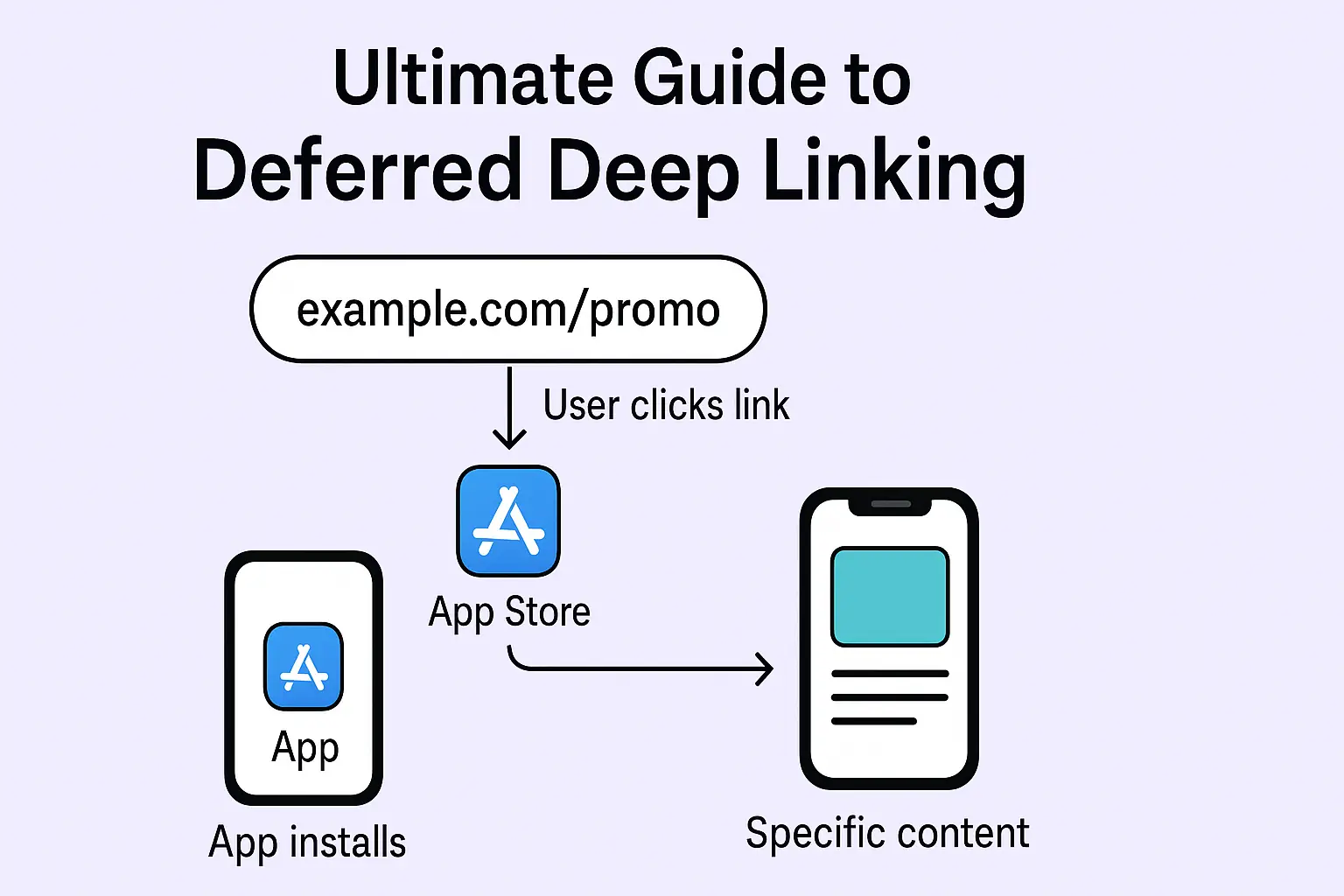
Have you ever clicked a link, ended up on the App Store, installed an app, and then landed right on the exact page you expected inside the app? That's deferred deep linking in action.
It's one of those behind-the-scenes technologies that makes mobile experiences feel seamless. This guide breaks down what deferred deep linking is, why it matters, how it works, and how to set it up for your own app in 2026.
Last updated: This guide was reviewed in August 2026. Firebase Dynamic Links has now been fully retired for well over a year, so we've removed it as a migration option entirely rather than treating it as breaking news. We've also expanded the implementation section with platform-specific integration steps, added a new section on match-rate accuracy and privacy limits, and updated the FAQ to match current search intent.
What Is Deferred Deep Linking?
Deferred deep linking is a way to send a user to a specific screen inside your app, even if that user doesn't have the app installed yet. The link "remembers" the intent through the install process. If you're new to the broader concept, it helps to first understand what deep linking in mobile apps actually is before layering the "deferred" part on top.
Here's the typical flow:
A user clicks your link (for example,
myapp.com/promo/123).If your app is already installed, the user lands straight on that page.
If the app isn't installed, you send them to the App Store or Play Store.
After they install and open the app, you route them to the same promo page they originally clicked.
So even though they didn't have the app to start with, the destination and context survive the install step.
Why Does Deferred Deep Linking Matter?
Deferred deep linking matters because it removes the single biggest drop-off point in mobile funnels: the gap between "clicked an ad" and "found the thing I clicked for" after installing an app.
1. Better User Experience
No one likes dead ends. A user who clicks a link for a specific sneaker, coupon, or article expects to land on that exact thing — not your app's generic home screen. Deferred deep links close that gap whether or not the app was already installed.
2. Higher Conversion Rates
Every extra tap a user has to make to find what they wanted is a chance for them to give up. Send someone to a generic home screen after install and you're asking them to re-search for the product, offer, or referral code they already clicked once. Cutting that friction is what actually moves install-to-signup and install-to-purchase rates.
3. Smarter Attribution
Because the link carries campaign, referrer, or content parameters through the install, you can tie every install back to the exact ad, creator, or campaign that drove it — instead of lumping everything into "organic" or "unknown."
4. Personalized Onboarding
When new users open your app for the first time, they see the exact content or offer that made them click, rather than a generic welcome screen. That first impression is what turns a curious tap into an activated user.
How Does Deferred Deep Linking Work?
Here's what's happening behind the scenes:
The user clicks your link. The link includes campaign or content details like
utm_source, referrer, orproduct_id.A redirect service handles the click. It checks whether the app is installed.
If the app isn't installed, the user goes to the App Store or Play Store. On Android, the referrer payload is handled via the Play Install Referrer API, while iOS relies on other signals, since it has no equivalent official referrer mechanism.
After the app is installed and opened, the app (through your SDK or backend call) retrieves those saved parameters.
The app routes the user to the correct screen — a product page, a referral signup, or a promo.
That's the core idea. The link remembers the context, and your app picks it up right after installation. If you want the deeper technical mechanics — how routing decisions actually get made under the hood — see how deep linking works, in full technical detail.
Best Deep Linking Solutions for App Marketing in 2026
The best deep linking solutions for app marketing in 2026 fall into two camps: full attribution platforms (Branch, AppsFlyer, Adjust, Kochava) and lighter link infrastructure tools built for teams that want speed and simple pricing (Smler). The right pick depends on whether you need heavy attribution modeling or fast, affordable deep links.
Platform | Best for | Notable trade-off |
|---|---|---|
Branch | Teams wanting deep attribution + deep linking in one SDK | Heavier SDK, longer integration |
AppsFlyer OneLink | Large-scale paid UA campaigns with multi-partner tracking | Pricing and setup scale with campaign volume |
Adjust / Kochava | Enterprise attribution and fraud prevention | Overkill if you just need deferred routing |
Smler | Teams that want deep links, deferred deep links, and analytics without legacy SDK bloat | Lighter on advanced multi-touch attribution modeling |
If your priority is fast setup, custom domains, and clear link-level analytics without a heavyweight attribution suite, that's exactly the gap Smler is built to fill.
What Are the Common Use Cases for Deferred Deep Linking?
Deferred deep linking shows up anywhere a marketing click needs to survive an app install. The most common examples, with more detail on how each one actually plays out:
E-commerce: Someone taps a product ad on social media, doesn't have the app, installs it, and lands directly on that exact product page with the discount already applied — instead of the storefront home screen, where most shoppers abandon before finding the item again.
Gaming: A player sees an ad for a specific level, boss fight, or limited-time reward. Deferred deep linking brings them back to that exact moment after install, rather than the title screen, which meaningfully improves day-one retention.
Referral programs: A referral link attaches a referrer ID that survives the install, so the new user's signup is correctly credited to the person who shared it — even though the new user never had the app before clicking. See our dedicated guide to referral marketing with deferred deep linking for how to structure this end to end.
Content platforms: A shared video, article, or playlist link opens directly to that content after install, instead of dropping the new user on a generic feed with no idea what brought them there.
Offline and QR campaigns: A poster, packaging insert, or in-store display carries a QR code instead of a text link. Scanning it triggers the same deferred flow — install if needed, then land on the exact page tied to that display. Our QR code deep linking guide for offline marketing covers how to set this up correctly.
SMS and WhatsApp campaigns: Recipients tap a link, install the app if needed, and land on the promo screen tied to that message — while the link itself stays compliant with local messaging regulations, such as India's TRAI-compliant SMS shortening requirements.
Why Consider Smler for Deferred Deep Linking?
If you're already building deep-link logic or doing bulk URL redirection, Smler is worth a look for three reasons.
Cost-Effective, Transparent Pricing
Smler is priced to undercut legacy attribution platforms significantly, because the infrastructure is newer and doesn't carry years of legacy SDK code that older platforms still have to maintain and charge for.
Built With Developer Needs in Mind
Smler provides a documented API, custom branded domains, and native support for deep links and deferred deep links. For teams running SMS campaigns in regulated markets, it also generates compliance-ready links with DLT headers required under India's TRAI guidelines — our guide on ensuring TRAI SMS compliance with custom domains and headers walks through the setup.
Easier Integration
Because Smler offers a full API and clear documentation, you can plug it into existing link-generation flows with minimal friction. Teams typically get a working deferred-linking stack running in hours rather than the days it can take with heavier legacy SDKs — meaning less time building and more time launching campaigns.
How Do You Implement Deferred Deep Linking?
You have two main paths: use an existing platform, or build your own.
1. Use an Existing SDK or Platform
Platforms like Branch, AppsFlyer OneLink, Adjust, Kochava, and Smler all handle link generation, attribution, and routing. If you're still on Firebase Dynamic Links, that migration should already be complete — the service has been fully shut down since 2025, and any links still pointing at it will fail to resolve. Our Firebase Dynamic Links migration guide covers moving to Smler's API without breaking existing campaigns.
Legacy attribution platforms can have a steeper integration curve because they're built on older SDK architectures. Smler is built on more modern infrastructure, so most teams can get a working stack running in a matter of hours rather than days. Our step-by-step guide to generating deferred deep links in Smler walks through the exact setup, and if you're implementing on a specific platform, the iOS Swift integration guide and Android integration guide cover the client-side code you'll need.
Refer to the deep links guide if you get stuck at any point — you can also schedule a call and our engineers will help your team integrate Smler directly.
2. Build Your Own (More Control)
If you want full flexibility and want to avoid vendor lock-in, you can build your own deferred deep link system. You'll need:
A backend service to store link parameters.
Client-side logic in the app (iOS/Android) to retrieve those parameters on first launch.
A redirect/tracking service to check install state and store the context.
Routing logic inside your app to land on the correct screen.
If you use a service like Smler, you offload most of the link-tracking and short-URL infrastructure work, and simply hook your app's routing logic to it.
How Accurate Is Deferred Deep Linking?
Deferred deep linking is not 100% accurate, and no provider — including Smler, Branch, or AppsFlyer — can honestly claim otherwise. Match rates depend on the platform and the matching method, so it's worth understanding the limits before you build conversion reporting around them.
There are two broad matching approaches:
Deterministic matching: Uses a hard identifier, such as the Android Install Referrer API, to link a specific click to a specific install with high confidence. This is the more reliable method where it's available.
Probabilistic matching: Estimates a match using signals like IP address, device type, timestamp, and OS version when no hard identifier exists. It's a best-effort match, not a guarantee, and accuracy drops as more users click links around the same time from similar networks.
Why iOS is harder to match than Android: Android's Install Referrer API gives Google Play a reliable way to pass click data through to a fresh install, which is why Android deferred links tend to match more consistently. iOS has no equivalent official mechanism, and Apple's App Tracking Transparency framework further restricts the signals available for probabilistic matching, so iOS match rates are typically lower and more variable than Android's. If you're integrating on either platform, it helps to understand the underlying mechanics first — see our guides on iOS Universal Links and Android App Links.
What this means practically: build a sane fallback for the users who don't get matched — usually the app's default home screen with a visible way to find the original offer, such as a search bar or a recently-viewed section — rather than assuming every install will resolve correctly.
How Do You Test Deferred Deep Linking Before Launch?
You test deferred deep linking by simulating the full click-to-install-to-open journey on a clean device, not just checking the deep link once the app is already installed. Skipping this step is the most common reason deferred links "work in the demo" but fail for real users.
Start from a device without the app installed. Testing on a device that already has the app hides the entire deferred-linking problem, since regular deep linking will mask it.
Click the real link, not a shortcut. Use the actual short link or app store link a user would tap from an ad, SMS, or social post.
Complete the install and open the app for the first time. Confirm the app lands on the correct screen, not the default home screen.
Check both platforms separately. iOS and Android use different mechanisms for deferred matching, so a working Android flow doesn't guarantee iOS works too, and vice versa.
Re-test after every SDK or OS update. Platform changes on either side can quietly break deferred matching without any error showing up in your logs.
For platform-specific steps, see our guides on how to test deep links on Android and how to test deep links on iOS.
Deep Linking vs Deferred Deep Linking: What's the Difference?
Regular deep linking only works if the app is already installed. Deferred deep linking works across installs — it remembers the landing intent even when the app has to be downloaded first. For a full technical breakdown of both mechanisms, see our deep linking vs deferred deep linking technical comparison guide.
Feature | Deep Linking | Deferred Deep Linking |
|---|---|---|
Works if app is already installed | ✅ | ✅ |
Redirects after install | ❌ | ✅ |
Typical use case | Re-engagement | New installs from links |
Attribution depth | Limited | Full click-to-install-to-open tracking |
Example link |
|
|
Note that Smler doesn't support legacy custom URI schemes, since it's built around modern Universal Links (iOS) and App Links (Android) rather than the older scheme-based approach most platforms have been moving away from.
Best Practices for Deferred Deep Linking
Always include a fallback URL pointing to a meaningful page — your website or the app store listing — for users who don't complete the install.
Secure your parameters. Don't expose tokens, referral codes, or personal data in a plain slug or query string.
Test across platforms (iOS, Android, mobile web) before launch — link behavior differs enough that a flow working on Android can silently fail on iOS.
Use UTM parameters and log clicks, installs, opens, and routing success so you can spot exactly where users drop off.
Keep redirect latency minimal — a slow intermediate redirect page is one of the most common reasons users abandon before the app store even opens.
Design a graceful fallback screen for unmatched installs, since even the best providers won't match every user — see the accuracy section above for why.
FAQ: Deferred Deep Linking
What are the best deep linking solutions for app marketing in 2026?
Branch, AppsFlyer, Adjust, and Kochava lead on full attribution modeling for large paid UA campaigns. Smler is a strong fit if you want fast setup, custom domains, and deep-link analytics without a heavyweight legacy SDK. The right choice depends on whether you need enterprise attribution or lean link infrastructure.
Is Firebase Dynamic Links still usable for deferred deep linking?
No. Firebase Dynamic Links has been fully retired since 2025 and no longer resolves links. If your app still relies on it, migrate to another provider such as Branch, AppsFlyer, Adjust, or Smler as soon as possible, since any old links pointing at it will now fail outright.
Does deferred deep linking work the same way on iOS and Android?
The concept is identical, but the mechanics differ. Android can use the Play Install Referrer API for deterministic matching, while iOS relies on probabilistic signals with no official referrer mechanism. Always test both platforms separately rather than assuming one flow covers both.
How accurate is deferred deep linking?
It's rarely 100% accurate. Android's Install Referrer API gives high-confidence, deterministic matches, while iOS typically relies on probabilistic matching that's less reliable and further limited by App Tracking Transparency. Always build a sensible fallback screen for installs that don't get matched.
How do you test deferred deep linking before launch?
Start from a device that doesn't already have the app installed, click the real link a user would tap, complete the install, and confirm the app opens to the correct screen. Test iOS and Android separately, since they use different deferred-matching mechanisms and can fail independently.
What's a real example of deferred deep linking in action?
A shopper taps a product ad, doesn't have the retailer's app, installs it from the App Store, and opens the app to find that exact product page with the discount still applied — instead of landing on the generic home screen and having to search again.
How much does deferred deep linking cost to set up?
Costs vary widely by provider and traffic volume. Enterprise attribution platforms typically charge based on monthly active users or click volume, while leaner tools like Smler are built around simpler, more predictable pricing. Check each provider's current pricing page before committing, since tiers change.
Final Thoughts
Deferred deep linking isn't just a technical implementation — it's a growth strategy. It connects your marketing funnel to your product experience and makes sure every user lands where they should, whether they had the app or not.
Whether you use a full-service SDK or combine a lighter tool like Smler with your own backend logic, mastering deferred deep linking can meaningfully improve conversions and retention.
Bottom line: If you're running campaigns that drive mobile app installs, deferred deep linking is worth adopting now. Make new installs feel like returning users by carrying context and intent from that very first click.
Published with LeafPad