
What Is a QR Code? Complete Beginner's Guide 2026
A QR code is a square, two-dimensional barcode that a phone camera can scan to open a link, save a contact, join a Wi-Fi network, or trigger a payment — without anyone typing a single character. This guide covers what a QR code is, what it looks like, how to scan one, and how to get, use, and download your own in 2026.
What Is a QR Code, Exactly?

A QR code — short for "Quick Response" code — is a matrix barcode that stores data in a grid of black and white squares instead of the single row of lines you'd find on a supermarket barcode. That two-dimensional layout lets it hold far more information, from URLs and contact cards to plain text and payment instructions, in about the same space a traditional barcode needs.
Denso Wave, a Japanese automotive supplier, invented the QR code in 1994 to track parts on assembly lines. The original use case was purely industrial. By 2026, the same technology shows up on restaurant tables, product packaging, invoices, event tickets, and just about every piece of marketing material you'll see this week.
What Does a QR Code Look Like?
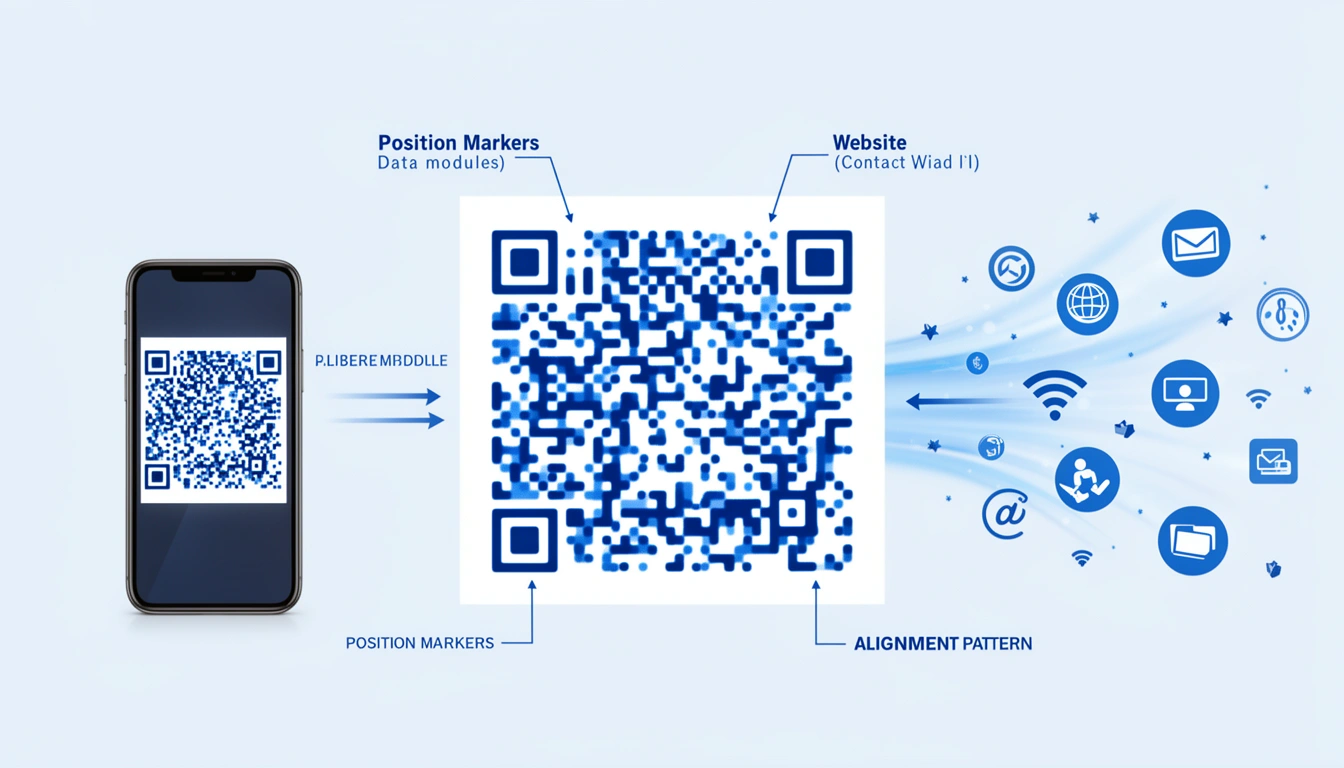
A QR code looks like a small square filled with an irregular pattern of black and white squares, with three larger squares sitting in three of its four corners. Those corner squares are what tell a scanner "this is a QR code" worth reading, and they let it recognize the code from almost any angle or distance.
Inside that square, four elements do the actual work:
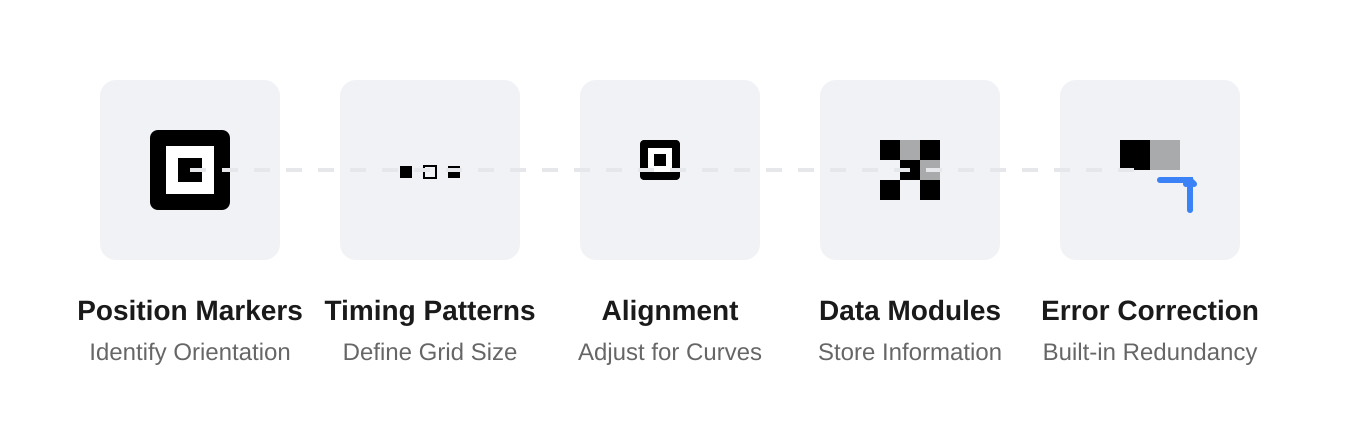
- Position markers — the three big corner squares that orient the scanner and mark the code's boundaries.
- Alignment patterns — smaller internal squares that help the scanner correct for a curved surface or an awkward angle.
- Timing patterns — the black-and-white lines connecting the position markers, which define the grid size.
- Data modules — the dense cluster of dots in the center, where the encoded information actually lives.
Most codes also carry built-in error correction: redundancy that lets a code still scan correctly even if up to 30% of it is damaged, dirty, or covered by a logo.
Is a QR Code a Type of Barcode?
Yes — a QR code is technically a type of barcode. It's a two-dimensional (matrix) barcode, as opposed to the one-dimensional (linear) barcodes printed on most retail products. That's why some people search for "QR barcode": it's the same object, just described a bit more precisely.
| Feature | Traditional Barcode | QR Code |
|---|---|---|
| Data direction | One-dimensional (left to right) | Two-dimensional (rows and columns) |
| Typical capacity | Around 20-25 characters | Thousands of characters |
| Scan angle | Needs a fairly straight-on scan | Readable from almost any angle |
| Common uses | Retail inventory, shipping labels | Links, contact cards, payments, Wi-Fi |
How Does a QR Code Work?
A QR code works through a four-step exchange: your data gets encoded into a pattern of squares, a camera photographs that pattern, software decodes it back into the original data, and your phone acts on it — opening a link, displaying text, or saving a contact.
- Encode: A string of data (like a URL) is turned into a pattern of black and white squares.
- Scan: A camera takes a picture of that pattern.
- Decode: Software reads the grid and converts it back into the original string.
- Act: The phone opens the browser, displays the text, joins the network, or saves the contact.
The main benefit is removing friction. Typing a long URL on a mobile keyboard is tedious; scanning is instant.
What Can a QR Code Store?
A QR code can store any short string of data, which in practice covers URLs, contact cards, Wi-Fi credentials, payment details, app store links, and map coordinates. It doesn't store a live connection to a website — it stores the text itself, which your phone then interprets.
- URLs: the most common use, and the one most tools default to.
- Contact info: vCards that save straight into a phone's address book.
- Plain text: instructions, Wi-Fi passwords, or short messages.
- Wi-Fi credentials: lets guests join a network without typing a password.
- Payment triggers: opens a payment app with the amount and recipient pre-filled.
- App store links: directs to an app's download page.
- Geo coordinates: opens a map pinned to a specific location.
For business use where you need to track scans or change the destination later, a platform like Smler's QR Code Generator handles that on the backend. You can also pair it with branded links so the destination URL matches your own domain instead of a generic shortener.
What Is a QR Code Scanner?
A QR code scanner is the camera-plus-software combination that reads a QR code's pattern and converts it back into usable data — a link, a contact card, or a piece of text. Since the late 2010s, this scanner has been built directly into the default camera app on both iOS and Android, so no separate app is required.
How to Scan a QR Code
To scan a QR code, open your phone's camera app, point it steadily at the code from about 10-30 cm away, and wait for a notification banner or link preview to appear on screen. Tap that banner to open the link, save the contact, or join the network.
- Open your camera app, or the dedicated scanner in Control Center (iOS) or Quick Settings / Google Lens (Android).
- Point it at the code and hold your phone steady until it focuses.
- Wait for the on-screen banner or preview link to appear.
- Tap the banner to complete the action.
If nothing happens, check the lighting — glare, shadows, or a dark code on a dark background are the most common reasons a scan fails.
How to Get a QR Code
The fastest way to get a QR code — sometimes phrased as "how to do a QR code" or "how to do the QR code" — is through a free online generator: enter the link or text you want to encode, choose static or dynamic, and download the image. It takes under a minute and needs no design or coding skills.
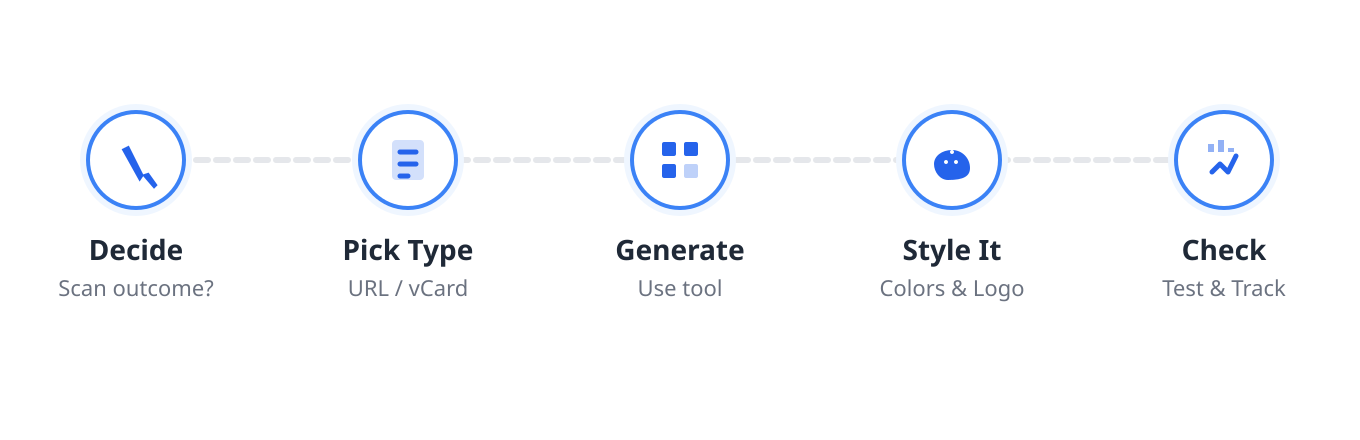
- Decide the action. What should happen when someone scans it?
- Pick the content type. URL, vCard, Wi-Fi, or plain text?
- Generate it. Use a tool like Smler's QR Code Generator, or compare options in this QR code generator with tracking comparison.
- Style it. Add colors or a logo, but don't sacrifice readability.
- Test it. Scan it with three different phones before you send it to print.
- Track it. If it's dynamic, watch the scan analytics after launch.
If you need dozens or hundreds of codes for a large campaign, look for a generator that supports bulk creation from a spreadsheet rather than making each one by hand.
How to Download a QR Code
Once you've generated a QR code, most tools let you download it instantly as a PNG or SVG file by clicking a download button next to the preview. PNG works fine for screens and most print jobs; SVG is better if you need to scale the code up for a large poster without losing sharpness.
A single static code usually downloads with no account needed. Dynamic codes, which redirect through a link you can edit later, typically require signing up so the code can be saved to a dashboard — a free QR code generator with tracking is worth using if you want scan data without paying upfront.
How to Use a QR Code
Using a QR code means deciding what happens after the scan, then placing the code somewhere people can reach it with a phone camera already in hand. Point it to a mobile-friendly destination — a menu, a Wi-Fi login, a product page, or an app download — and label the code so people know what they'll get.
Common real-world uses include restaurant menus, event check-ins, packaging that links to product details, business cards, payment prompts, and app-install prompts that route straight to the right store listing.
Static vs. Dynamic vs. Custom QR Codes
Static codes have their data baked in permanently; dynamic codes redirect through an editable short link; custom codes add branding on top of either type. Which one you need depends entirely on whether the destination might ever change.
| Type | Editable after printing? | Best for |
|---|---|---|
| Static | No — data is fixed in the code | Plain text, Wi-Fi passwords, permanent instructions |
| Dynamic | Yes — it redirects through a short link you control | Marketing campaigns, A/B testing, anything that might change |
| Custom | Depends on the underlying type | Branding with custom colors, dot patterns, or a logo in the center |
For a full breakdown of formats, see the Types of QR Codes guide, or the icon QR code design guide if you're embedding a logo.
Why Are QR Codes Everywhere in 2026?
QR codes are everywhere in 2026 for three reasons: contactless habits from the early 2020s never went away, phones now scan them with the default camera, and marketers can finally measure what a physical code actually drives online.
Hygiene. The push for contactless interactions cemented QR codes as the standard for menus and payments.
Native support. The era of downloading a dedicated "QR scanner" app — once a major friction point — is over.
Marketing utility. You can track them. Using QR code deep linking for offline marketing, a code can open a specific page inside an app rather than just a website, and a QR code analytics guide can show you exactly how that offline scan converted.
QR Code Best Practices
- Size matters. Minimum 2x2 cm for close-range codes; go larger for posters people view from a distance.
- Label it. "Scan for menu" gets better engagement than a naked code.
- Mobile-optimize the destination. A desktop-only landing page wastes the scan.
- Mind the lighting and contrast. Avoid dark codes on dark surfaces or codes placed behind glare-prone glass.
Common QR Code Mistakes to Avoid
- Placing codes somewhere a phone can't comfortably reach, like near the floor or ceiling.
- Printing them too small to focus on.
- Using a static code for a campaign whose destination might change later.
- Skipping the test scan before printing at scale.
FAQs About QR Codes
What is a QR code used for?
QR codes are used to link the physical world to a digital action: opening a website, displaying a restaurant menu, joining Wi-Fi, saving a contact, triggering a payment, downloading an app, or checking in to an event — all without typing a URL by hand.
How do I get a QR code for my business?
Use a QR code generator, enter the URL or content you want to encode, and choose a dynamic code so you can edit the destination later without reprinting. Add your brand's colors or logo, test it on a few phones, then download and print it.
How do I scan a QR code without an app?
Open your phone's default camera app and point it at the code — iOS and Android have had built-in QR scanning for years. On iPhone, the Control Center scanner also works; on Android, Google Lens or Quick Settings usually has a shortcut too.
What's the difference between a QR code and a barcode?
A QR code is a two-dimensional barcode that stores data across a grid, while a traditional barcode is one-dimensional and stores data in a single line of bars. QR codes hold far more information and can be scanned from almost any angle.
How do I download a QR code I created?
Click the download button next to the code preview in your generator to save it as a PNG or SVG file. PNG suits most screens and standard print jobs; SVG is better for large-format printing where you need the code to scale without losing quality.
QR codes are a small utility with an outsized job: bridging the physical and digital worlds cheaply and reliably. For more specific applications, see 7 Innovative QR Code Use Cases to Boost Sales in 2026.
Published with LeafPad